
A Simple Habit That Pays:
Tracking Payments in Billability
You're already creating and sending invoices with Billability — well done. That's a strong start. But there's one simple habit that can make the tool far more powerful for your business: tracking the payments you receive and marking your invoices as paid.
Doing this takes just a minute or two and brings real clarity and peace of mind.
Login and Open Your Invoices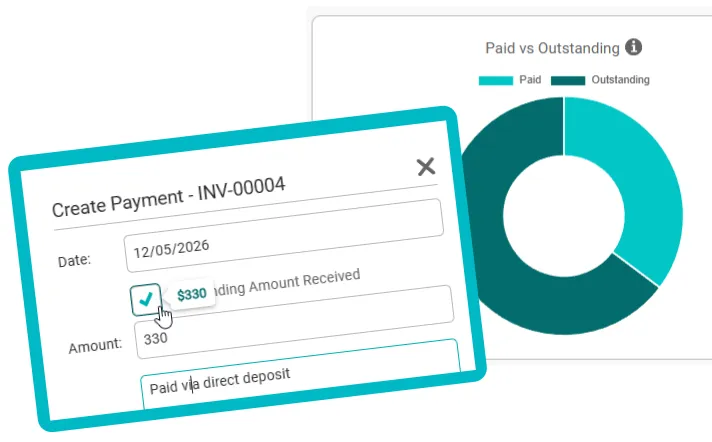
Why Tracking Payments Makes a Difference
Know exactly where you stand
At a glance, see which invoices are paid and which are still outstanding. No more mental notes or searching through bank records.
Stay organised effortlessly
Record each payment quickly so everything stays up to date in one place. Your dashboard becomes your single source of truth.
Spot issues early
Clear reports show you what money is still owed, so you can follow up promptly and keep cash flowing. Don't let overdue invoices slip through the cracks.
Simplify tax time
If you're registered for GST, your records are ready for reports like your BAS. You'll also avoid the frustration of paying tax on money you haven't actually received yet.
Everyday Benefits You'll Notice
More time for what you do best
Spend less time worrying about money and more time on the work you specialise in. When your records are current, your mind is free.
Get paid faster
Quick follow-ups on outstanding invoices dramatically improve your chances of being paid — and help prevent situations where clients run out of funding (such as with NDIS) or simply forget amid their other commitments.
Feel more in control
Replace uncertainty with clear answers. When you know exactly what's been paid and what's still owing, running your business feels smoother and less stressful.
How to Start It's surprisingly easy
Open your Invoices page
Log into your Billability account and go to your Invoices page. You'll see all the invoices you've sent, with clear status indicators showing what's paid, outstanding, or overdue.
Click on the paid invoice
Find the invoice for which you've received payment and click to open it. You'll see all the invoice details including the total amount and any payments already recorded.
Click "Create Payment"
Scroll to the bottom of the invoice and click the "Create Payment" button. This opens a simple form where you record the payment details.
Enter the date and amount
Fill in the date you received payment and the amount. You can record a partial payment too — the system will automatically update the remaining balance. That's it. No bookkeeping skills required.
Need a hand getting started?
If you have any questions, our Australian support team is always happy to help. We're real people based in Australia who understand small business.
Contact support →